Overview
If your email sender disconnects repeatedly, this issue originates from your Email Service Provider (ESP). This is more common with SMTP/IMAP providers; Gmail and Outlook rarely experience this problem.
Common Reasons for Disconnection
Sending too many emails
High email bounce rate
Unstable Email Service Provider
Provider detected cold email activity
Provider detected spam-like behavior
Password changed or expired
Why Do My SMTP Accounts Disconnect Every Few Days?
SMTP accounts often disconnect because of:
- ISP throttling — Your email provider limits connection frequency to prevent abuse
- IP reputation resets — Shared IP addresses rotate, causing authentication failures
- Password expiration — Some providers expire app passwords or require periodic re-authorization
- Cold email detection — Consumer-grade SMTP providers monitor for bulk-sending patterns and block them
Important: We do not provide disconnection logs. To find the exact reason, check the error message shown next to your sender in SalesBlink and share it with your ESP.
Bulk SMTP Providers (Titan, Namecheap, Hostinger, etc.)
Do not use consumer bulk SMTP providers for cold email. Providers like Titan, Namecheap, Hostinger, and similar shared hosting email services are not designed for cold email outreach. They will block or disconnect your account as soon as they detect bulk-sending patterns.
For cold email, use providers specifically designed for this purpose:
- Google Workspace (Gmail)
- Microsoft 365 (Outlook)
- Dedicated cold email mailbox providers
Do I Need to Whitelist Any IPs?
No. SalesBlink does not use fixed IP addresses for monitoring or sending that require whitelisting. Disconnections are handled between your email provider and SalesBlink's connection layer.
Gmail / Outlook OAuth vs SMTP Disconnects
| Connection Type | Why It Disconnects | How to Fix |
|---|---|---|
| Gmail / Outlook OAuth | Password changed, account security alert, or temporary OAuth token expiry | Re-authorize the connection in SalesBlink |
| SMTP / IMAP | Provider throttling, IP rotation, password expiry, or anti-spam detection | Check error message, contact ESP, or switch to a cold-email-friendly provider |
Note: Gmail and Outlook generally disconnect only because of a password change or a temporary error. They rarely disconnect repeatedly if your account is in good standing.
Find the Exact Reason
- Navigate to Outreach → Email Senders.
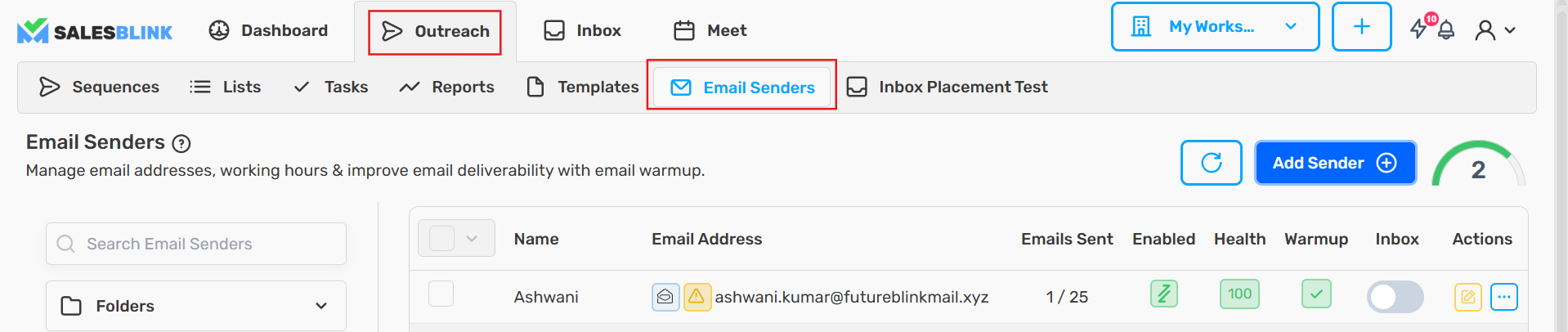
- Hover over your email address.
- Look for the error icon next to the sender.

The specific error message will be displayed. Share this error with your ESP to understand the exact issue.
How SalesBlink Handles Disconnection
- When a sender disconnects, it stops sending and SalesBlink tries to reconnect it automatically, starting 30 minutes later.
- SMTP/IMAP senders get up to 3 attempts: after 30 minutes, then 3 hours later, then 12 hours later.
- Google and Outlook senders get 1 attempt, after 30 minutes. If it fails, sign in again to reconnect them.
- If reconnection fails, you will receive a notification.
- Emails that were due from the sender while it was disconnected are marked as errors and are not retried. After you reconnect, reschedule those sequences. See How to fix Error leads in a sequence?.
Manual Reconnection
- Edit your email sender settings.
- Update details if required.
- Click Save.
Important: If disconnection occurs repeatedly, contact your SMTP server provider with the error details.